




Xtify | Local-first, private AI note taker. No bot added.
Zoom
Google Meet
Microsoft Teams
Slack
Discord
WhatsApp
Telegram
WeCom
Skype
Feishu / Lark
Messenger
Webex
GoToMeeting
Fathom
Tencent Meeting
WeChat
Notion
Loom
LINE
Linear
Xtify
Private AI note taker · Local-first

Your meetings
stay on your Mac.

Every meeting app you use, collapsed into one memory that remembers every decision, action, and risk. No bot joins your calls.

Local-first, privacy-first
No bot added
60 languages
Speaker diarization
Scroll to collapse
Local-first

Your recordings never leave your Mac.

The cloud only sees enough to transcribe — never enough to keep.

Stays yours.

The cloud only borrows it — for seconds.

Your Mac
Cloud
Deleted
Audio out
Notes back
Audio deleted from cloud
Recorded locally

Every meeting is saved to your Mac first. Nothing is uploaded for storage — only for the seconds it takes to transcribe.

Cloud, briefly

Audio is sent for transcription only, processed, then discarded. We don't keep a copy on our servers.

Enterprise-grade models

Transcription and extraction run on enterprise-tier speech and language models — not consumer tiers that train on your data.

Your whole week, in one window.

Recorded across every platform — no bot required
Zoom Google Meet Microsoft Teams Slack Discord WhatsApp Telegram WeCom Feishu / Lark Webex WeChat Tencent Meeting GoToMeeting Zoom Google Meet Microsoft Teams Slack Discord WhatsApp Telegram WeCom Feishu / Lark Webex WeChat Tencent Meeting GoToMeeting
Xtify — Meetings
This week6
Project Atlas — week 6 sync
52 min · 5 speakers
Northwind — discovery
1h 04 · 6 speakers
Helios — steering
38 min · 7 speakers
Internal — staffing
22 min · 4 speakers
Tencent MeetingMeridian — vendor eval
45 min · 5 speakers
Feishu / LarkQBR prep — Vantage
28 min · 3 speakers
Via Zoom · Today 09:30

Project Atlas — week 6 sync

AI summary

Client confirmed a phased rollout, starting with the APAC pilot in Q3. Workstream 2 scope is locked at four deliverables. A compliance blocker around the data-sharing agreement now sits with the client's legal team.

2
Decisions
5
Actions
2
Risks
See it in action

Watch a meeting become memory.

The pipeline

Four steps. Fully automatic.

Save
System + mic audio
ASR
Transcribe + diarize
LLM
Extract structure
Summary
Decisions · actions · risks
atlas-sync.m4a
52:14 · 48 MB · captured
Captured the moment the call started.
AL"Let's commit to the phased rollout — APAC pilot first, targeting Q3."
Transcribed with speaker diarization.
Let's commit to the phased rollout — APAC pilot first.
I'll confirm data-access approvals with IT by Monday.
Legal review of the MSA could slip past kickoff.
Extracting decisions · actions · risks
Decision — roll out in phases, APAC pilot first.
Action — confirm data-access approvals · PM · due Mon
Risk — MSA legal review may slip past kickoff.
Why Xtify

Made for one person, a small team, or a lone salesperson.

Every meeting app you use, every client you work with — collapsed into one place that remembers all of it. No bots joining your calls, no cloud agent reading them.
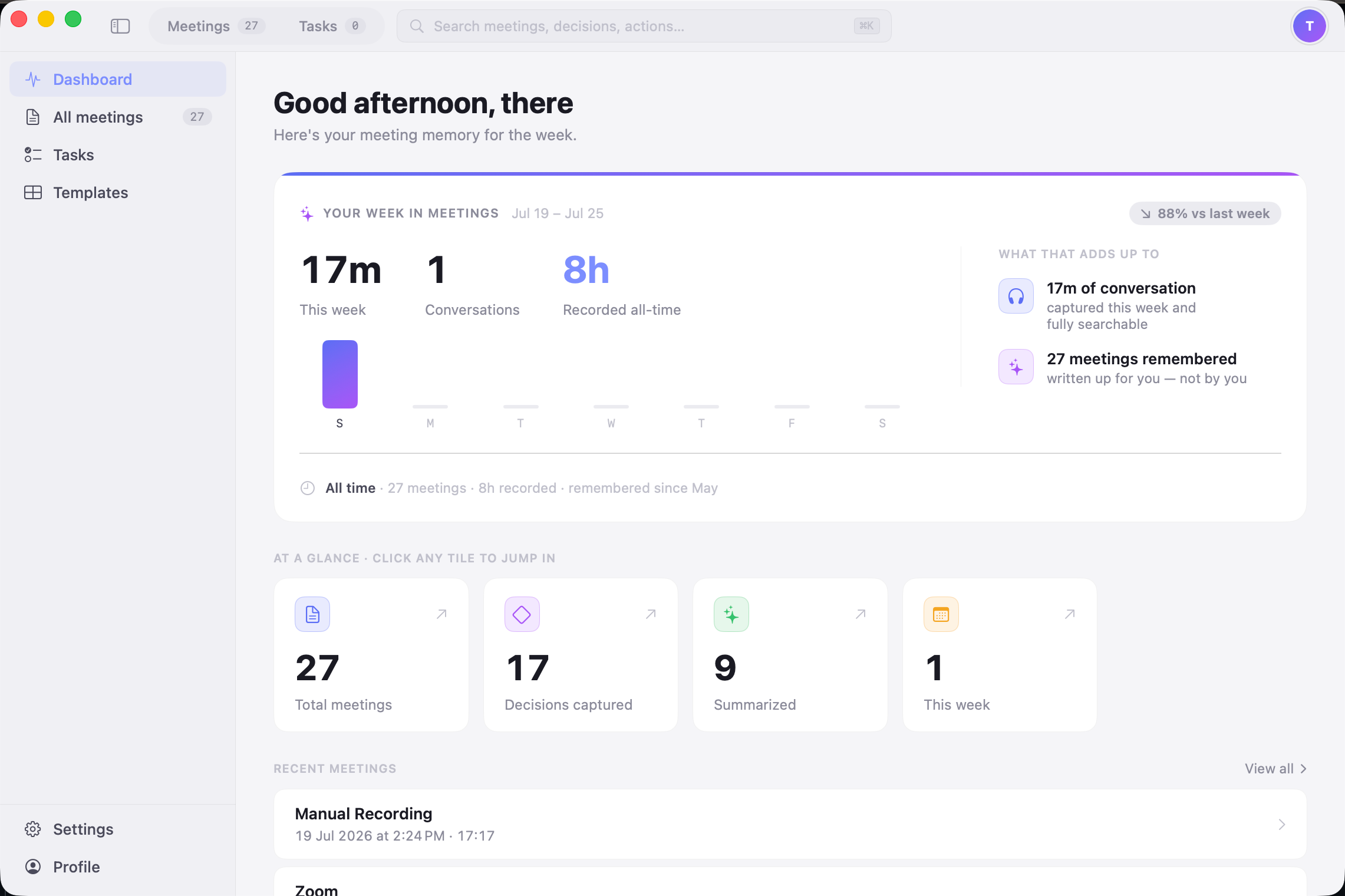
Xtify dashboard
Every platform, no bot

Zoom, Meet, Teams, Slack Huddle, WeCom, Discord — captured straight from system and mic audio. No bot joins the call, no invite required — and recording keeps going even if you mute yourself mid-call.

Memory that stays local

Your meeting memory is stored and indexed on your Mac. Local AI agents can query it directly through Xtify's local MCP — cloud agents can't.

Built for individuals, not seats

Freelancers, consultants, and ICs running 5+ meetings a day — not a team rollout that waits on admin approval.

The output

Read it like a memo.

Meeting summary · Project Atlas

Week 6 client sync

via Zoom · 52 min · 5 speakers · recorded today

The client confirmed a phased rollout, starting with the APAC pilot in Q3. Scope for workstream 2 is locked at four deliverables — no new requests until phase 2. A compliance blocker around the data-sharing agreement was raised by RK and now sits with the client's legal team.

Decisions2
Roll out in phases — APAC pilot first, targeting Q3.
Lock workstream 2 scope at four deliverables until phase 2.
Action items5
Draft revised rollout timeline.ALThu
Confirm data-access approvals with IT.PMMon
Send updated cost model v3.RKFri
Risks2
HIGHClient legal review of the data-sharing MSA may slip past the pilot kickoff date. — raised by RK
MEDAPAC stakeholder availability over the holiday period. — raised by SM
Export as Markdown · Plain text · PDF
Copy for agent
Pricing

Start free. Upgrade when you need more.

Free · No card required

Download for free.

The free version auto-records every meeting the moment it starts and lets you export each one as an audio file — all stored locally on your Mac, no bot, no card.

Download for free
  • Auto-record every meeting
  • Export as audio (.m4a)
  • Everything stays on your Mac

Need transcription and AI? Upgrade any time.

Pro
$6/mo

For individuals just getting their meetings out of their head.

Most popular
Pro Max
$10/mo

Unlimited memory, unlimited speakers, and local MCP for your own agents.

Ultra
$22/mo
$211.20 billed annually

For consultants running separate memory across every client.

See full pricing & features
FAQ

Common questions

Where are my recordings stored?

On your Mac. Audio only goes to the cloud briefly, for transcription — it's not kept there afterward.

Do you train AI models on my meetings?

No. Transcription and extraction run on enterprise-tier ASR and language models, which aren't trained on customer data.

Which meeting platforms does Xtify support?

All of them — Zoom, Meet, Teams, Slack Huddle, WeCom, Discord, and more. Xtify captures system and mic audio directly, so no bot ever joins your call.

Does Xtify work on Windows or iOS?

Xtify is available for macOS today. iOS is in development.

How does speaker diarization work if we share a mic?

Xtify separates voices by how they sound, not by input device — Speaker 1 and Speaker 2 come out distinct even from the same microphone.
See all FAQs
Now available for macOS

Never lose a decision again.

Install Xtify, join your next call, and let every meeting tool you use feed one memory that remembers for you.

Download for Mac is available now · iOS — coming soon · Requires macOS 13+, Apple silicon & Intel